

Advanced Settings - Manage Referenced Masters
The following table describes the additional fields available on the Manage Referenced Masters section.
| Fields | Description |
|---|---|
|
Expiry Field |
Note: Only date fields can be selected from this field. Ensure your master
record includes an expiry date field.
This field allows you to select a date field in the selected list/entity. The customer/entity will be marked as expired after this date. For instance, let's assume your list has the fields shown in the following screenshot, and you have added an item for a customer called AUF Steels. 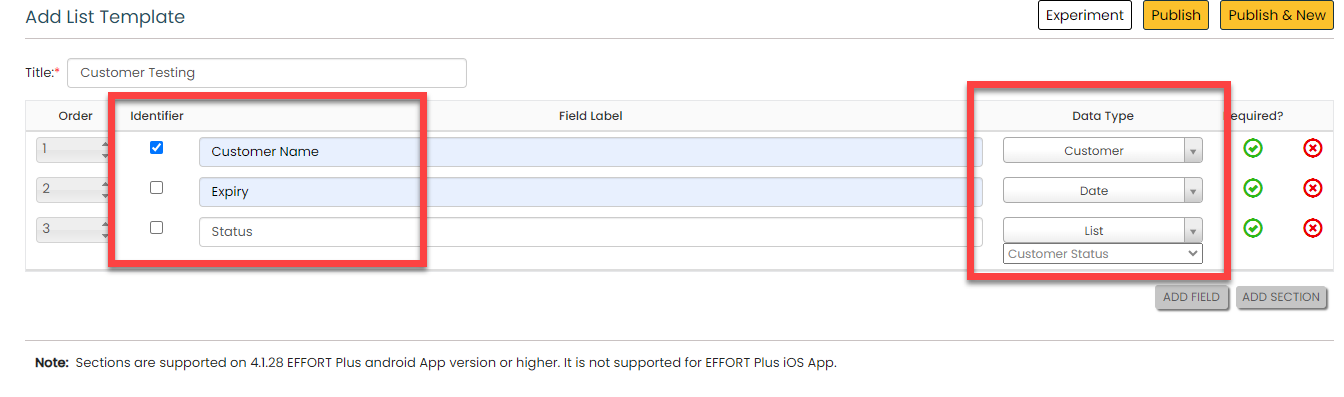 In the screenshot above, you can see the Customer Status list field that contains items such as Active and Inactive. If you select 01-08-2024 as the expiry date and select Inactive in the Expiry Value field (the field below), the customer will be marked as expired after the 1st of August. |
|
Expiry value |
This field allows you to select a value from the list/entity that you configured to the Activation field. Based on the value selected, the customer will be marked as expired after the configured date. If instance, if you select the value as Inactive and select the expiry date as 01-08-2024, the customer will be marked as expired after the 1st of August. |
|
Activation Field |
This field allows you to select only the list fields. Configure the field based on the which you want to use to make the customer/entity active. |
|
Activation value |
This field allows you to select the items you added in the list that you configured to the above field. Configure the item based on the which you want to use to make the customer/entity active. |
|
Expiry Color Code |
This field allows you to select a color code for expired customers. The date will be highlighted with the configured color, indicating that the customer has expired. |
|
Activation Color Code |
This field allows you to select a color code for active customers. The date will be highlighted with the configured color, indicating that the customer is active. |
|
About to Expire Color Code |
This field allows you to select a color code for the about to expire customers. The date will be highlighted with the configured color, indicating that the customer is about to expire. |
|
About Expire Days |
This field allows you to define the number of days. The customer will be marked as about to expire the configured number of days before the expiry date. |