

Mobile Sign-Ins
The Mobile Sign-Ins card provides the sign-in status of the employees in percentages. You
can see some options and a pie chart on the card. The pie chart shows the metrics in
percentages, and the exact number is shown beside the option. The employee details get
displayed in a pop-up window when you click on the pie chart or option. Find the below
screenshot for a sample Mobile Sign-ins card.
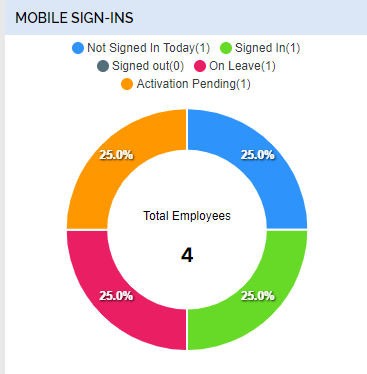
You can get the below metrics on the Mobile Sign-Ins card.
- Not Signed In Today: It shows the total number of employees who have not signed into the mobile app today.
- Signed In: It shows the total number of employees who have already signed into the mobile app.
- Signed Out: It gives the total number of employees who have already signed out today.
- On Leave: It gives the total number of employees who are on leave today.
- Activation Pending: It gives the total number of employees who have not yet activated the mobile app.