

Assign Approval Process - Configuration Options
| Field | Description |
|---|---|
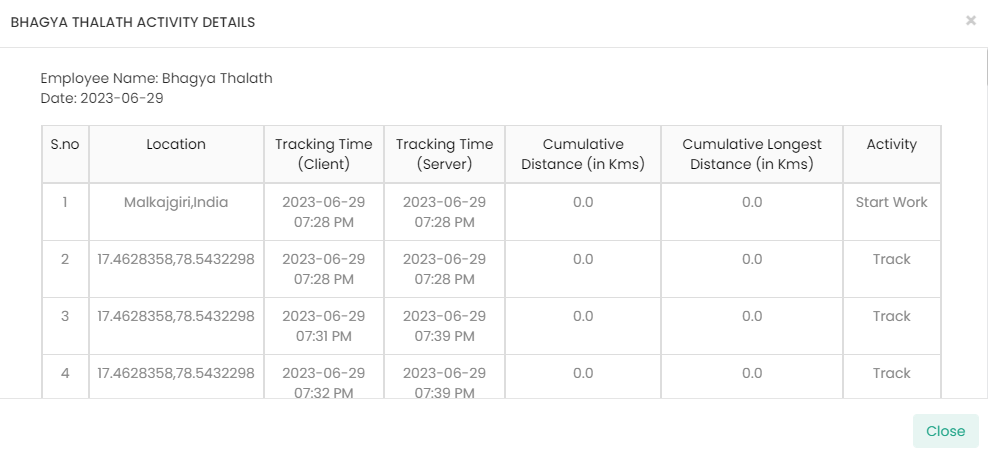
| Enable/Disable Employee Activities view while Approving |
When you enable this option, you can see the <Employee Name>
Activity Details on the form approval screen. The approver
can click the button to see the details of the activities performed by the
submitter.
 |
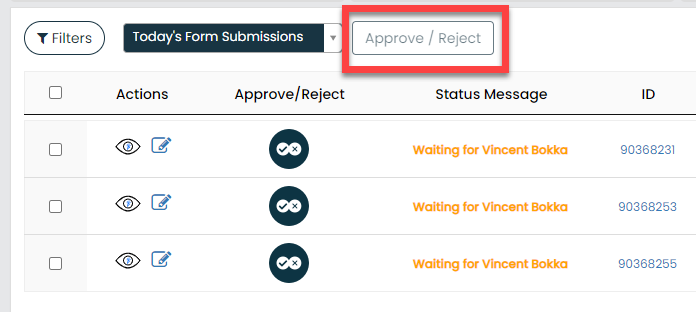
| Enable/Disable Bulk Approvals |
When you enable this option, you can see the
Approve/Reject button on the form submission list
screen. An approver can select multiple form submissions and approve them
all at once with a single click.
 |
| Notification when Workflow is Comes to My Approval |
When this option is enabled, a notification will be automatically sent to the approver to request their approval. |
| Notification when Workflow is in A submission is Approved |
When this option is enabled, the submitter will receive a notification once the approver approves the form submission. |
| Notification when Workflow is in A submission is Rejected | When this option is enabled, the submitter will receive a notification if the approver rejects the form submission. |