

Data Types - Assistance
| Field | Description |
|---|---|
|
The Email data type allows you to enter a valid email address. It validates if the email address entered is in the format: yourname@domain.com. The below image shows how an Email field appears on the form when you access
it from the Web App:
 The below image shows how an Email field appears on the form when you access
it from the Mobile App:
 |
|
| Location |
The Location data type allows you to enter valid latitude and longitude
values or select a location from the map. You can also restrict the users to
select a location from the map only. The below image shows how a Location
field appears on the form when you access it from the Web App:
 The below image shows how a Location field appears on the form when you
access it from the Mobile App:
 |
| Phone |
The Phone data type allows you to enter a valid phone number. You can enable
OTP based verifications to verify a phone number using OTP. The below image
shows how a Phone field appears on the form when you access it from the Web
App:
 The below image shows how a Phone field appears on the form when you access
it from the Mobile App:
 |
| URL |
The URL data type allows you to enter a URL - the link to a website or web
page. The below image shows how a URL field appears on the form when you
access it from the Web App:
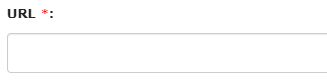 The below image shows how a URL field appears on the form when you access it
from the Mobile App:
 |